Last Updated April 2026
Adobe Firefly 3
The commercially safe AI that generates brand-consistent assets directly inside Photoshop instead of gambling on copyright claims.
AI generators produce stunning work in 2026, but using them commercially means gambling on copyright. Adobe Firefly 3 eliminates that gamble. Trained exclusively on Adobe Stock, openly licensed content, and public domain works, it’s the only major generator offering full IP indemnification for enterprise customers.
The AI layer also embeds directly inside Photoshop, Illustrator, and Express — not as a separate web app. The trade-off? Outputs lean polished rather than artistically wild. This Tool Chamber review covers what the platform delivers and whether it justifies the cost.
What Is Adobe Firefly 3?
Adobe’s third-generation generative AI model family powers text-to-image, text-to-vector, Generative Fill in Photoshop, video generation, and audio tools. It works as a standalone web app and natively inside Creative Cloud applications. Its defining trait is commercial safety — every output is designed for licensed commercial use. Built for design agencies, brand teams, and freelancers already inside Adobe’s ecosystem.
Key Features & Capabilities
- Commercial safety with IP indemnification. The only major AI generator trained solely on licensed content. Enterprise customers receive legal defense against copyright claims — no competitor matches this.
- Structure Reference and Style Match. Upload images to dictate exact composition or enforce a visual style across generations, giving designers precision control over brand consistency.
- Native Creative Cloud AI integration. Powers Generative Fill/Expand in Photoshop, Text to Vector in Illustrator, and AI design in Express — embedded in existing workflows, not bolted on.
- Multi-model access and Custom Models. Work with 30+ AI models (Google, Runway, OpenAI) in one interface. Train custom models on your brand assets for consistent output.
The Best Commercially Safe AI Image Generator for Enterprises
Multiple lawsuits targeting AI generators trained on copyrighted web data are progressing through courts in 2026. Brands publishing assets from tools with unclear training data face real liability.
Adobe offers qualifying enterprise customers legal indemnification covering defense costs and damages if a copyright claim arises. No other enterprise AI image generation platform provides this protection. Marketing assets, product imagery, and brand collateral can all ship at scale without per-asset legal review.
Critical nuance: this protection applies to outputs from Adobe’s own models. Third-party models in the interface may carry different terms.
How Firefly 3 Integrates Directly With Photoshop and Illustrator
The AI layer lives inside the applications designers already use — generation happens within the editing process, not as a separate step.
In Photoshop:
- Generative Fill lets you select an area, type a prompt, and fill it with context-aware AI content matching surrounding lighting, perspective, and texture — directly on PSD layers.
- Generative Expand extends images beyond original canvas boundaries with seamless content, ideal for reformatting across aspect ratios.
- AI Assistant (public beta) executes edits from natural-language descriptions — “remove the background person,” “warm up the sky” — with optional AI Markup for spatial precision.
In Illustrator:
- Text to Vector Graphic generates scalable, editable vector paths from prompts — icons, patterns, and illustrations immediately usable as native objects.
- Design Intelligence learns your brand’s visual rules (colors, fonts, logos) to auto-generate consistent, on-brand designs.
In Adobe Express:
- One-click design generation lets non-designers produce social posts and banners with brand guidelines automatically applied.
Who Should Use It?
Ideal users:
- Design agencies producing commercial client work where copyright safety is non-negotiable.
- Enterprise marketing teams generating high-volume campaign assets that must be legally safe.
- Brand managers needing outputs that strictly match guidelines via Structure Reference and Custom Models.
- Freelancers on Creative Cloud who want AI generation inside their existing Photoshop/Illustrator workflow.
Not ideal for:
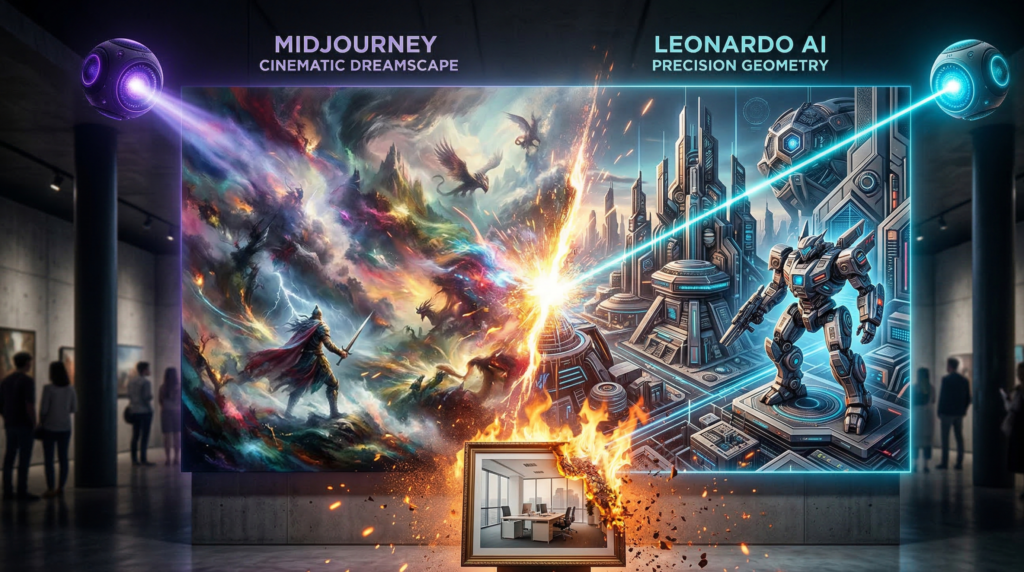
- Artists seeking creative randomness. Midjourney produces more visually striking, unpredictable imagery.
- Budget-conscious creators. The free tier offers only 25 credits/month — competitors provide far more.
- Teams outside Adobe’s ecosystem. Without Photoshop or Illustrator, the deepest advantages don’t apply.
Pros and Cons
Pros:
- 100% commercially safe with enterprise IP indemnification — unmatched legal protection.
- Unmatched integration with Photoshop, Illustrator, and Express — AI embedded in core workflows.
- Unparalleled composition control via Structure Reference for precise layout guidance.
- Highly accurate vector generation — editable SVG output where most generators fail entirely.
Cons:
- Less artistically adventurous than Midjourney — outputs can feel like stock photography.
- Credit system is confusing — fast credits, standard-speed generation, and third-party model limits create billing complexity.
- Free tier is inadequate — 25 credits barely evaluates the tool.
Pricing & Plans
The platform uses a generative credits system. After fast credits are exhausted, images generate at standard speed rather than being blocked.
| Plan | Price | Generation Access | Key Inclusions |
|---|---|---|---|
| Free Tier | $0 | 25 credits/month | Basic text-to-image |
| Firefly Premium | ~$4.99/month | 100 fast credits; standard speed after | Full web app, Boards, iOS |
| CC Photography | $9.99/month | Included credits + in-app AI | Photoshop + Lightroom |
| CC All Apps | $59.99/month | 1,000 fast credits/month + full suite | All Adobe apps + AI layer |
| CC for Teams | $89.99/user/month | Team credits + admin controls | All Apps + IP indemnification |
IP indemnification requires Teams/Enterprise plans. Individual subscribers get commercial safety but not formal legal defense. Custom Models require a paid subscription.
Start free at Here — 25 monthly credits, or try a Creative Cloud trial for Generative Fill.
Using Structure Reference and Style Match for Brand Consistency
This feature set transforms the tool from a “generate random images” engine into a precision design instrument.
Structure Reference uses an uploaded image as a compositional blueprint — the AI follows exact subject positioning, proportions, and spatial layout while generating new content. Text prompts alone can’t guarantee this level of layout precision.
Style Match applies a reference image’s visual characteristics — color palette, lighting, texture, contrast — to any new generation, keeping outputs within the same brand family.
Combined with Custom Models trained on your own assets, this creates a three-layer control system: Structure for on-template composition, Style for on-brand visuals, Custom Models for fine-tuned consistency across hundreds of generations. No competitor offers this layered brand control.
Adobe Firefly 3 vs Midjourney: Which Is Better for Professional Designers?
| Feature | Adobe Firefly 3 | Midjourney |
|---|---|---|
| Primary strength | Brand-safe commercial generation | Artistic quality and visual impact |
| Training data | Licensed Adobe Stock + public domain | Web-scraped (copyright unclear) |
| IP indemnification | Yes (enterprise plans) | No |
| Image artistry | Clean, polished, stock-style | Dramatic, moody, highly stylized |
| Structure Reference | Yes | No direct equivalent |
| Photoshop integration | Native | None |
| Vector output | Yes (editable SVG) | No |
| Pricing | ~$4.99–$9.99/month standalone | $10–$60/month |
Choose this tool for brand-safe commercial assets inside professional design workflows. Choose Midjourney for concept art and creative exploration where legal safety is secondary. Not the right fit for artists prioritizing raw creative unpredictability.
Still exploring your options? Check out our ultimate breakdown of the 10 Best AI Image Generators of 2026 to compare features, pricing, and find the perfect tool for your workflow.
Final Verdict: Is It Worth It in 2026?
Adobe Firefly 3 leads in one critical category: commercially safe AI generation for professional design workflows. No competitor matches its licensed training data, IP indemnification, native Creative Cloud integration, and precision brand controls.
The trade-offs are real — outputs lack Midjourney’s drama, the free tier is stingy, and the credit system creates confusion.
The bottom line: If you produce commercial assets inside Photoshop or Illustrator and need legal certainty, this is the only tool delivering safety, control, and workflow integration in one package.
Want to try Adobe Firefly 3 for free? Claim your 25 free monthly credits here and start generating commercially safe images today.
Tool Chamber Score
Frequently Asked Questions (FAQ)
Is Adobe Firefly 3 free to use? Partially. The free tier offers 25 credits/month. Paid subscribers (~$4.99/month) get 100 fast credits, with standard-speed generation after exhaustion. Creative Cloud subscribers get features like Generative Fill bundled in.
Is it safe to use these images commercially? Yes. The platform is trained exclusively on licensed and public domain content. Enterprise customers on Teams/Enterprise plans receive formal IP indemnification — unique among major AI generators.
How does it compare to Midjourney? Midjourney produces more dramatic imagery for concept art. This tool produces cleaner, brand-controlled outputs with native Photoshop integration and IP safety. Choose based on whether you prioritize artistic impact or compliance.
What is Structure Reference? A feature using an uploaded image as a compositional blueprint — the AI follows exact positioning and layout while generating new content. Essential for templated brand work.
Does it work inside Photoshop? Yes. It powers Generative Fill, Generative Expand, Generative Remove, and the AI Assistant — all on PSD layers with non-destructive editing.